3.1 Software Process Model
At the heart of Aumazing's development is the Agile Software Development framework, specifically the Kanban approach. Agile emphasizes iterative development, collaboration, responsiveness to change, and the continuous delivery of valuable software — making it ideal for projects that require ongoing refinement and feedback throughout development.
Kanban adds a layer of visual workflow management: it visualizes work, limits work in progress (WIP), and promotes continuous improvement through transparent workflow stages. The proponents selected Agile-Kanban because Aumazing includes multiple modules — user account management, child profiles, gamified pre-assessment, AI-based analytics, module recommendation, progress tracking, a parent dashboard, screen time management, and a premium therapy gateway — each needing to be designed, tested, improved, and integrated progressively.
This setup is also practical for a student capstone: it supports phased development, continuous monitoring, and incremental completion without requiring the team to freeze requirements at the start.
3.1.1 Rationale for Using Agile-Kanban
The choice of Agile-Kanban is grounded in several key advantages:
- 🔄 Flexibility in the face of change — Requirements and interface designs can evolve mid-project without derailing progress. For an app targeting children with ASD, where usability, structure, and clarity of interaction are critical, this flexibility is essential.
- 🧪 Continuous feedback and testing — Each component is tested as it's completed rather than waiting until the end. This matters especially when primary users are young children who may not articulate what isn't working.
- 📊 Visual progress tracking — Kanban boards provide a transparent, at-a-glance view of the project's status, helping the team identify priorities, monitor throughput, and resolve bottlenecks.
- 🎯 Reduced multitasking — By limiting WIP, Kanban encourages deep focus on current tasks, leading to higher quality output and fewer context-switching errors.
3.1.2 Kanban Workflow Stages
The Aumazing project organizes its workflow into five Kanban stages:
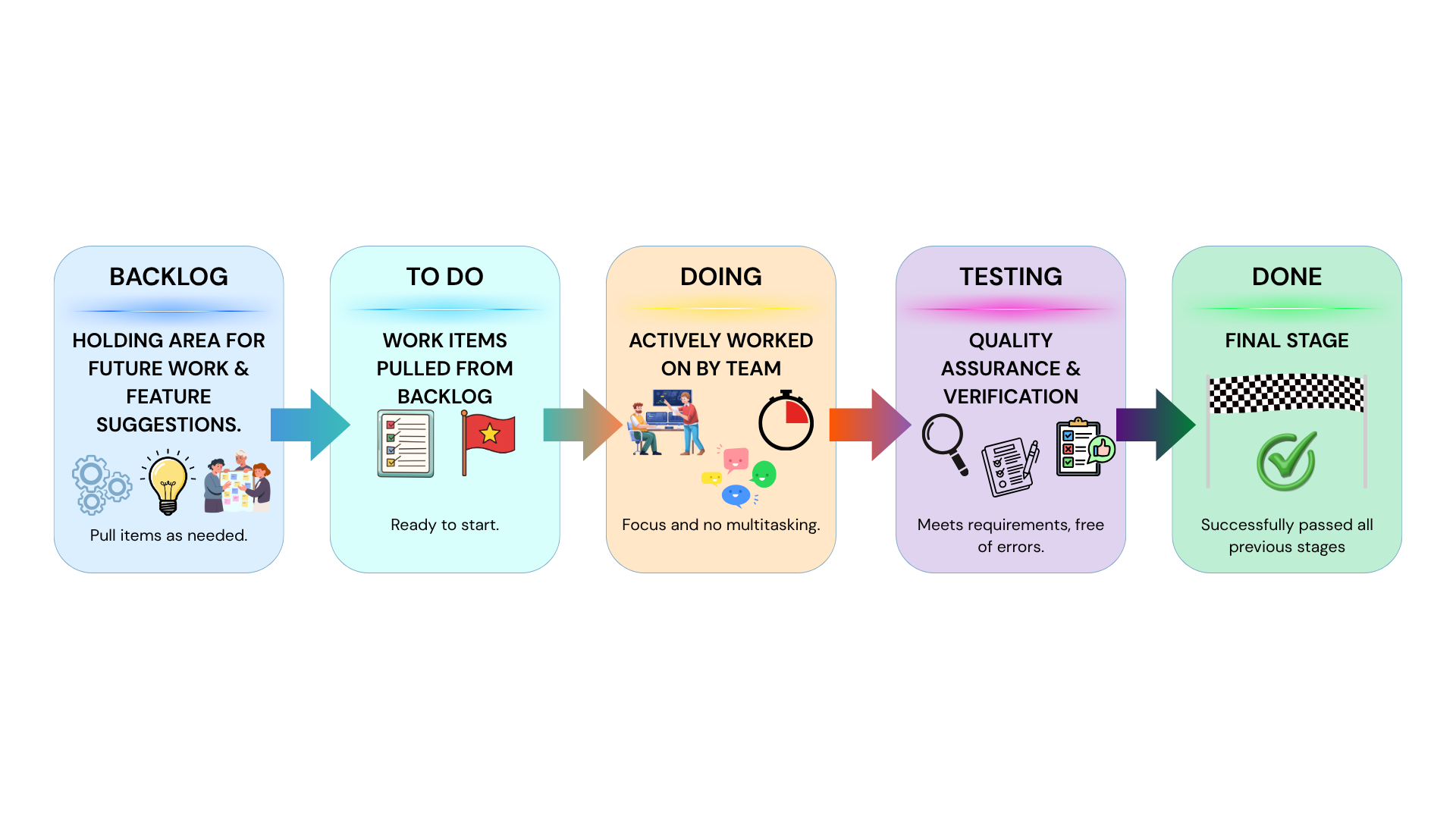
Figure 3.1: Kanban Board Stages Diagram
- 📝 Backlog — The comprehensive inventory of all future work items and development tasks. This serves as the primary holding area for every proposed feature and technical suggestion.
- 📋 To Do — Specific work items strategically selected from the backlog, signifying their readiness for imminent implementation.
- 🔨 Doing — Items under active development. The number of concurrent tasks is strictly limited to three to maintain focus and minimize cognitive load.
- 🧪 Testing — Completed features undergo rigorous quality assurance to verify compliance with requirements and ensure the system is free of technical errors.
- ✅ Done — The terminal phase: items have successfully satisfied all preceding validation stages and developmental milestones.
3.1.3 Development Activities in the Framework
Under the Agile-Kanban umbrella, the team executes six core activities:
- 1️⃣ Planning and Requirement Gathering — Identifying the goals of the study, defining system requirements, and organizing the features needed by users.
- 2️⃣ System Design — Creating the system architecture, interface layouts, process flows, navigation structure, and database design.
- 3️⃣ Incremental Development — Building module by module, starting with core features (registration, login, child profiles, assessments) then advancing to analytics, dashboards, recommendations, and therapy functions.
- 4️⃣ Testing and Revision — Each feature is tested post-implementation for usability, accuracy, and correct system behavior. Issues are cycled back into the workflow for correction.
- 5️⃣ Evaluation and Validation — The completed prototype is evaluated by selected users and qualified validators (teachers, specialists, practitioners) to assess appropriateness, usability, and relevance.
- 6️⃣ Documentation and Finalization — Finalizing the prototype, technical documentation, and capstone manuscript.
3.1.4 Artifacts of the Chosen Framework
The Agile-Kanban process produces a rich set of deliverables that serve as both evidence of progress and developmental guides:
3.2 Software Requirements
This section defines what Aumazing must do and how well it must do it. The requirements are based on the project objectives and the identified features: mobile access, child profile management, gamified pre-assessment, AI-driven assessment analytics, module recommendation, progress tracking, parent dashboard, screen-time monitoring, and premium therapy support.
3.2.1 User Requirements
User requirements are expressed as user stories — concise narratives that capture who the user is, what they want, and why.
👨👩👧 Parent / Guardian Stories:
- 🔐 Register and log in securely to access and manage the child's records
- 👶 Create and manage a child profile so the app can personalize activities
- 🎮 Have the child undergo a gamified pre-assessment to determine the appropriate starting level
- 🧠 Receive module recommendations based on the child's performance, matched to developmental needs
- 📊 View progress, performance summaries, and recommendations in a centralized dashboard
- ⏰ Regulate screen time for balanced, healthy usage
- 💾 Have the system save the child's progress and assessment history over time
- 📹 Access premium features — video conferencing and therapy center directory — for additional support
🧒 Child User Story:
- 🎮 Interactive, visually guided 2D learning activities that make learning enjoyable and easy to follow
👩⚕️ Validator / Practitioner Story:
- 📝 Assess the relevance and usability of the system so its effectiveness for the intended users can be evaluated
3.2.2 Functional Requirements
The functional requirements describe what the system should do, how it should react to user inputs, and how it should behave in specific situations. Aumazing has 33 individual functional requirements:
- Parents can create accounts with validated registration (rejects incomplete, invalid, or duplicate data)
- Registered users can log in with valid credentials; incorrect inputs trigger error messages
- Parents can create, edit, and manage child profiles
- Child profile completion is required before accessing assessments and learning modules
- Gamified pre-assessment provided when a child profile is newly created
- Records gameplay indicators: response time, answer accuracy, retries, errors, time spent, completed activities
- AI-driven analysis of indicators using XGBoost
- Recommends appropriate starting module or level based on results
- Post-assessment after module completion; pre/post comparison to measure performance changes
- Displays learning modules according to the child's current developmental level
- Children can access and complete 2D interactive learning activities
- Immediate visual or interactive feedback during gameplay
- Performance is recorded during each activity
- Reward-based or progression-based structure to encourage continued participation
- All completed activities, progress records, and results are saved to the system database
- When offline, unsynced gameplay and assessment records are stored locally
- Local records automatically synchronize with the cloud once connectivity returns
- Dashboard updates after every completed assessment or learning activity
- Shows completed activities, level progression, assessment summaries, and recommendations
- Parents can set and manage screen-time limits; system notifies when limits are reached
- Restricts gameplay when screen-time is exceeded (unless reset by parent)
- Video conferencing for remote consultation via the premium therapy gateway
- Directory of therapy centers or practitioners for consultation and support
- Protected access through authenticated user login
- Generate formal medical, psychiatric, or psychological diagnoses
- Replace licensed therapists, developmental specialists, or medical professionals
- Provide premium video consultation without a stable internet connection
- Allow unauthorized users to access another child's records or progress data
3.2.3 Non-Functional Requirements
Beyond what the system does, the non-functional requirements define how well it must perform — the quality attributes and operational constraints:
Child-friendly, visually guided, understandable for parents and young users
Core screens, assessments, and dashboards load within acceptable response times
User accounts and child data protected through secure authentication
Accurate and consistent data saving without loss during normal operation
Organized codebase allowing future updates, debugging, and expansion
Runs on supported mobile devices and operating systems
Supports addition of more modules, reports, and services in future versions
Handles profiles, results, logs, and offline records without degrading performance
3.3 Software and Hardware Requirements
This section presents the software and hardware technologies required to develop, test, and implement Aumazing. The selected tools were chosen based on their suitability for a six-month capstone project, their support for cross-platform mobile development, and their compatibility with the proposed features — particularly the 2D gamified learning activities, AI-driven assessment, progress monitoring, offline support, and premium therapy gateway.
3.3.1 Software Requirements for Development
The Aumazing tech stack is thoughtfully composed, with each layer chosen for a specific purpose:
Flutter provides the cross-platform UI framework, while Flame is a modular 2D game engine built on top of Flutter. Flame's GameWidget embeds game scenes directly inside the Flutter widget tree alongside standard components (forms, dashboards, overlays, navigation). This keeps the entire app — UI, assessment scenes, and mini-games — within a single development ecosystem.
Supabase provides a Postgres-based backend platform with built-in database, authentication, storage, and related services. Every project includes a full Postgres database, making it ideal for managing parent accounts, child profiles, progress logs, assessment results, and therapy directory entries.
SQLite is a self-contained, serverless, zero-configuration SQL database engine embedded in the mobile app. It handles cached child records, offline gameplay data, and unsynced assessment logs until internet connectivity returns and synchronization occurs — ensuring children can keep playing even without Wi-Fi.
The AI layer is a separate microservice. FastAPI provides a modern, high-performance API framework, and XGBoost delivers optimized gradient boosting for gameplay-based assessment analytics. The mobile app sends gameplay indicators (response time, accuracy, retries, errors) to this API, and XGBoost returns assessment outputs for module recommendation and progress analysis.
Rather than building a complex ML recommender, the system uses assessment scores, response time, error frequency, and skill tags attached to learning modules to determine the most appropriate next activities. This practical approach aligns with the project scope.
Jitsi Meet is a free, open-source video conferencing platform with an Android SDK that can be embedded into the mobile app — providing remote consultation functionality without the cost of commercial video platforms.
3.3.2 Hardware Requirements for Development
To develop and test the proposed system, the proponents will need:
- 💻 Laptop or desktop computer — Capable of running Flutter development tools, Android Studio, local databases, design tools, and backend services. Must support code editing, emulator execution, model testing, and documentation.
- 📱 At least one Android mobile device — For real-device testing, especially validating 2D learning activities, touch-based interaction, local data caching, and video conferencing features.
- 🌐 Stable internet connection — Required for backend testing, online authentication, cloud database access, and premium gateway evaluation.
3.3.3 Hardware and Software Requirements for End Users
For families using Aumazing:
- 📱 Compatible mobile device — Preferably an Android smartphone or tablet with sufficient storage and an updated operating system.
- 🌐 Internet connectivity — Required for account authentication, cloud sync, dashboard updates, therapist directory access, and video conferencing.
- 💾 Offline capability — Selected game activities and local records can function offline through SQLite-based storage until the device reconnects and data syncs.
This hybrid online/offline architecture is a deliberate design decision, ensuring that children can continue learning even in connectivity-challenged environments.
3.4 Feasibility Issues
A feasibility study determines whether a proposed project is practical, achievable, and worth pursuing before major resources are committed. It examines whether the project is viable in terms of resources, cost, technical capacity, operations, and schedule. For this study, the proponents examine feasibility across four dimensions.
3.4.1 Economic Feasibility
The proposed capstone is economically feasible because it is developed as an academic prototype using available student resources and predominantly free development tools. The main costs — internet access, possible software subscriptions, testing devices, hosting services, and design utilities — are manageable within scope.
Beyond cost management, the app provides tangible practical value: it supports home-based intervention activities and helps parents continue structured learning exercises outside formal therapy sessions. While it doesn't replace licensed diagnosis or treatment, it can meaningfully reduce barriers to accessing structured home-based support.
3.4.2 Technical Feasibility
Every required feature can be implemented using currently available, well-documented technologies:
- 🎮 Flutter + Flame — Unified environment for mobile UI and 2D mini-games
- 🗄️ Supabase — Postgres-based backend with authentication and storage
- 💾 SQLite — Offline caching and local game logs
- 🤖 FastAPI + XGBoost — Lightweight AI assessment service as a separate API
- 📹 Jitsi Meet — Embeddable video conferencing for premium therapy
The entire stack is sufficiently capable of supporting the proposed architecture within the project's time frame, scope, and the team's technical capacity.
3.4.3 Operational Feasibility
The project directly addresses the identified need for structured, accessible, home-based support for children with early-stage ASD. It's designed for parent-guided use and child participation, fitting naturally into the context of home-based intervention.
Key features — guided activities, progress monitoring, recommendation support, and optional therapy access — align with the daily needs of families. Crucially, the system is positioned as a supplementary support tool, not a replacement for specialists, therapists, or medical professionals — making it practical for integration into existing care routines.
3.4.4 Schedule Feasibility
The project has a defined development period covering planning, design, development, testing, evaluation, and documentation. By using Agile-Kanban, the team can divide work into smaller tasks, monitor progress continuously, and complete modules incrementally.
Projected Schedule Flow:
Planning & Requirements
Design & Prototype
Testing & Evaluation
Revision & Documentation
3.5 Chapter Summary
This chapter presented the complete methodology of the Aumazing project, tying together the how and the with what:
- 📋 Process — Agile-Kanban provides a flexible, visual, and iterative framework that supports the phased development of a multi-module application.
- 📝 Requirements — A comprehensive set of user stories, 33 functional requirements, and 10 non-functional quality attributes define exactly what the system must do — and what it must not.
- 🛠️ Technology — A modern, practical tech stack (Flutter/Flame, Supabase, SQLite, FastAPI/XGBoost, Jitsi Meet) is selected for capability, cost-effectiveness, and compatibility.
- ✅ Feasibility — The project passes all four feasibility tests — economic, technical, operational, and schedule — confirming that Aumazing is not just a good idea, but a buildable, deliverable one.
The methodology demonstrates that Aumazing is structured, practical, and achievable within the intended scope of a capstone study — a project built with intention, from the process framework down to the choice of every library and tool.
Chapter 3 Complete!
You've explored the full methodology behind Aumazing — from Agile-Kanban workflows to AI-driven assessments. Built with research, designed with love for children with autism. 🌟